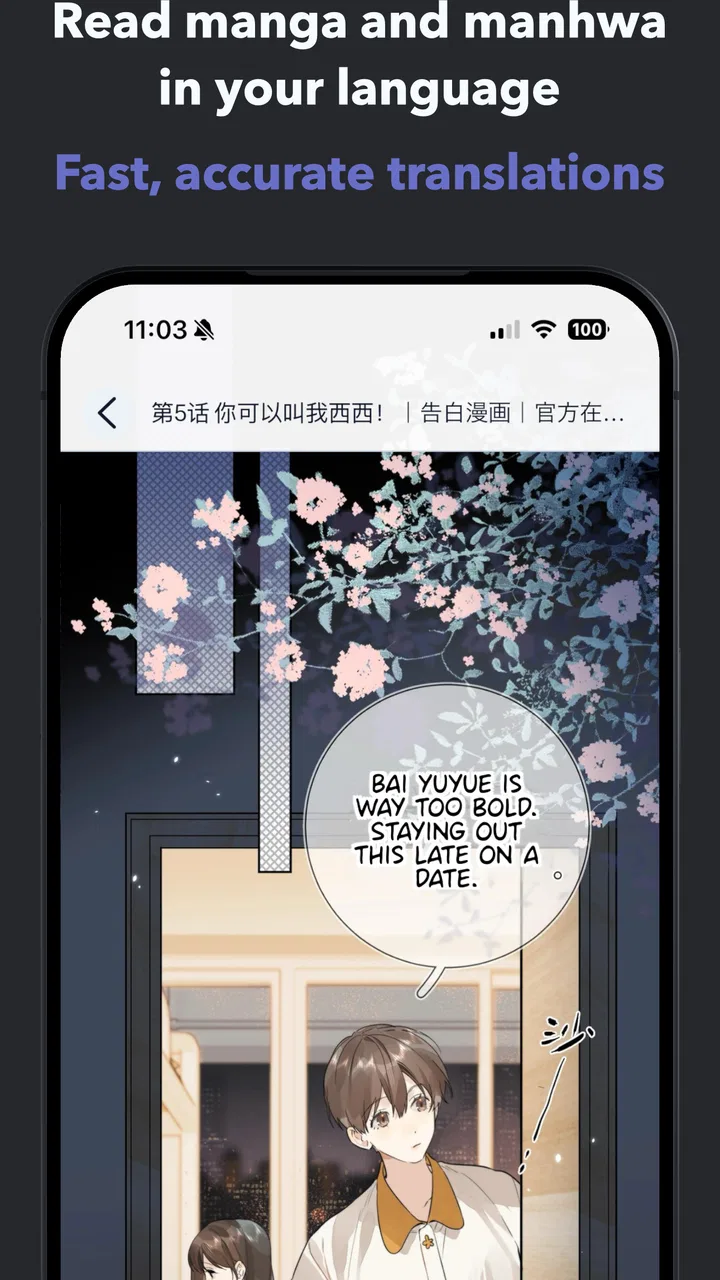
OpenToon - Manga Translator
- 4.5
- Rating
- 50.00K
- Installs
- Free
- Price

 Analysis by App-foxy
I tried OpenToon - Manga Translator with a simple household question in mind: can one person use it to make manhwa and webtoons easier to understand without turning a shared phone or tablet into a confusing free-for-all? My overall answer is yes, with an important qualification. It is most useful as a focused reading aid for translated comic pages, not as a complete comic library, social platform, or replacement for an official localized edition.
The app comes from OpenNovel and sits in the comics category. Its purpose is easy to understand: help translate manhwa and webtoons so readers can follow stories that might otherwise remain out of reach. That narrow focus is actually one of its strengths. I did not approach it expecting recommendations, subscriptions to a catalog, or a reading community. I approached it as a tool for dealing with language friction, and that is where its value becomes clearest.
It is free to start, carries an Everyone age rating, and has reached over ten thousand installs. The average score is 4.4, based on around two thousand ratings, which suggests that the basic idea is landing well with readers. The current release is version 1.1.2, and the app requires Android 10 or later. Optional purchases range from $2.99 to $29.99 per item, so I would still check the purchase screen carefully before handing the device to a younger reader.
You May Also Like

 AccuWeather: Weather Radar
AccuWeather Review: A Quick, Clear Forecast for Everyday Decisions
For everyday plans, the best forecast is the one you can understand quickly. AccuWeather makes rain timing, radar, and local conditions easy to act on, with a few trade-offs.

 Hill Climb Racing
Why Hill Climb Racing Still Turns Crashes Into One More Run
A tiny car, a bumpy hill and one more upgrade: Hill Climb Racing keeps resurfacing because its simple chaos makes every near-miss feel personal.

 AliExpress - Shopping App
AliExpress Makes Global Shopping Feel Personal, but Shoppers Bear the Risk
AliExpress turns a global marketplace into a pocket-sized discovery engine. Its reach is useful, its shopping loop compelling, and its trade-offs easy to miss.

 Lords Mobile: Kingdom Wars
Lords Mobile Is a Kingdom-Building Routine, Not a Quick Match
A case-by-case verdict on the building, battles, device demands, and social commitments that make Lords Mobile rewarding for some players and exhausting for others.

 PDF Scanner app - TapScanner
TapScanner Makes Paperwork Easier to Capture, Check, and Share
TapScanner makes scanning with a phone feel less like a rescue operation and more like a dependable step in getting work done. Its capture tools are useful, though not flawless.

 Block Blast!
Block Blast! Shows How Much a Puzzle Game Can Leave Out
A quiet grid game shows why puzzle players increasingly value instant clarity, repeatable skill and low-pressure play—and where the genre still needs to catch up.
More From Our News Desk
View All News


How OpenToon fits into a shared household
When I think about OpenToon on a shared household device, the key is agreeing on how each person will leave a reading session for the next one. I’d keep translated pages clearly associated with their source and ask readers to flag lines that seem confusing rather than treating every result as definitive. That small routine makes passing the tablet around easier and gives each reader a useful starting point.
A realistic evening use case
Imagine a family sharing a tablet. One person has found a webtoon recommendation, but the available pages are not in a language they read comfortably. Another household member wants to look at the same story later, perhaps on the bus or before bed. In that situation, OpenToon is useful because it addresses the exact obstacle instead of asking everyone to learn a new reading service.
I would use it in a short, deliberate session: open the comic material, work through the pages that matter, and keep the translated result close to the original context. That is different from settling down with a polished official edition. The app belongs in the gap between “I cannot understand this page” and “I need a fully localized release.” For occasional reading, that gap can be surprisingly important.
Shared-device use also changes how I judge the app. A tool that works well for one owner may feel awkward when several people take turns. Here, the sensible approach is to treat each reading session as separate. The person using the device should know which source pages they are working with and should avoid assuming that another reader will automatically understand what has already been translated.
The best household habit is to keep the app task-specific: use it when language is the barrier, then return the device in a clear state. That sounds basic, but it prevents a younger reader or another family member from opening a half-finished translation and mistaking it for a complete comic experience.
What the app is, and what it is not
OpenToon is an app, not a standalone comic publisher. That distinction matters when deciding whether it belongs on a shared device. I would not install it expecting a built-in replacement for every official manhwa service. Its role is translation, so the quality of the experience depends on the pages being handled and on how readable the translated result is.
For readers who already use official platforms in their preferred language, those services remain the better choice for polished lettering, consistent terminology, creator support, and a smoother long-term reading routine. OpenToon is more appealing when a specific title or page is unavailable in a language you understand, or when you want help interpreting material without waiting for an official localization.
That trade-off is easy to miss. Translation can make a page understandable, but it does not automatically reproduce the careful editing of a professional release. Jokes, honorifics, sound effects, cultural references, and speech bubbles with unusual layouts may need personal judgment. I found the app more valuable when I treated its output as assistance rather than unquestionable final text.
Keeping setup boundaries clear
On a personal phone, it is natural to open an app and experiment. On a family tablet, setup deserves more care. I would first make sure the device is running Android 10 or newer, since that is the minimum operating system requirement. I would also install it under the household member who is most likely to manage comic-reading sessions, rather than placing the app on every device without a reason.
The next boundary is financial. The app is free, but it includes optional purchases, with individual items priced from $2.99 up to $29.99. That does not make it unsuitable for families, but it does mean that a shared device should not be treated as if every tap is consequence-free. An adult should review the purchase flow and decide who is allowed to approve anything before the app is used casually by children.
I also recommend separating “trying the translator” from “starting a regular reading habit.” During the first session, I would test a few different page layouts rather than judging the entire app from one clean panel. Comics can place text over artwork, curve lettering around characters, or use very small speech bubbles. A translation tool may feel excellent on one page and less convincing on another, so a small trial gives a more honest impression.
Another practical boundary is source organization. If several people use the same tablet, keep the original comic pages and translated results easy to distinguish. Otherwise, someone may overwrite, move, or misinterpret another reader’s work. I would use a simple naming habit based on the title and chapter, without assuming that the app itself will coordinate the household’s files or reading history for you.
Coordinating without built-in family assumptions
OpenToon does not become a family organizer simply because several people use it. I would not rely on it to tell one reader where another stopped, which pages are approved for younger readers, or which translation belongs to which person. Those decisions need a household routine.
A good routine is to agree on three small things: who is using the device, what material they are translating, and where the finished pages should remain. This is especially helpful when one family member is studying a language while another is following a story. The same app can serve both purposes, but the expectations are different. One person may compare wording with the original, while another only wants a quick understanding of the plot.
For shared use, I would also avoid leaving a sensitive or personal reading session open. That is not a criticism unique to this app; it is simply sensible device etiquette. If a tablet is passed around, close the work area and return to a neutral screen. OpenToon is easier to share when everyone understands that it is a tool on a common device, not a private account boundary by itself.
Coordination becomes even more important when purchases are involved. A parent or device owner should handle payment decisions, while other readers can request access to the features they need. This keeps the app’s free starting point useful without making the household guess who approved a charge.
Age, trust, and the Everyone rating
The Everyone rating makes OpenToon approachable for a broad audience, but I would not treat an age label as a complete guide to every comic a person may translate. The app can be used with many kinds of manhwa and webtoon material, and the source content determines much of the reading experience. Parents should still know what titles their children are opening.
This is where trust matters more than a simple rating. A younger reader may be perfectly capable of using a translation tool but still need help deciding which comic pages are appropriate. I would explain that the app helps with language; it does not automatically judge the story, remove mature themes, or replace an adult’s knowledge of the source.
The same principle applies to teenagers and shared family accounts. A translation result can look authoritative because it appears directly on a comic page, yet wording may be imperfect. I would encourage readers to ask when a sentence seems strange, especially in scenes where humor, relationships, or important plot details depend on nuance. That turns the app into a useful conversation tool instead of an unquestioned authority.
For language learners, this is a real advantage. Comparing a translated line with the original can reveal how expressions change across languages. The app is therefore more interesting than a basic “tap and read” shortcut when the user is willing to slow down. The limitation is that this requires attention; someone looking only for instant, flawless localization may find the process less satisfying.
Where it beats ordinary alternatives
The usual alternative is to search for an official translation. When one exists and is accessible, I prefer it for regular reading. Professional localization usually handles typography, continuity, terminology, and cultural context more consistently. It also gives the reader a cleaner experience than working around individual pages.
OpenToon becomes more compelling when the official option is unavailable, delayed, or not offered in the reader’s language. It can also help someone decide whether a title is worth pursuing before committing to a longer reading routine. In that role, it is less like a bookstore and more like a bridge between a page and the person trying to understand it.
Another alternative is a general-purpose translation tool. Those can be convenient for isolated text, but comics are not ordinary paragraphs. Speech bubbles, artwork, vertical reading order, stylized lettering, and sound effects all affect meaning. A comics-focused translator has a more relevant purpose than copying every line into a separate translation box, even though the result still deserves a quick human check.
There is also the option of asking another bilingual reader for help. That remains better for jokes, dialect, emotional subtext, and difficult cultural references. OpenToon is faster and more private for routine pages, but a human explanation is often superior when a single phrase changes the tone of an entire scene.
Small workflow choices that improve the experience
My first useful tip is to test a representative page, not just the easiest one. Choose a page with several speech bubbles, varied text sizes, and some artwork behind the lettering. If the app handles that page comfortably, you will have a better idea of whether it suits the title you want to read.
Second, translate in meaningful groups rather than treating every page as an isolated emergency. Keeping a chapter or scene together makes names and recurring expressions easier to compare. It also reduces the chance that a reader will forget which translated page belongs to which part of the story.
Third, pause when the translation sounds unusually literal. A strange sentence may be accurate in a narrow sense but misleading in context. I would compare nearby dialogue, look at who is speaking, and consider whether the line is a joke, an idiom, or a sound effect. This extra step is particularly valuable in romance, comedy, and action scenes where tone carries as much meaning as vocabulary.
Fourth, use the app as a decision aid for reading priorities. If a title is only mildly interesting, a quick translation session can answer whether the premise and tone are worth further effort. If the story becomes a favorite, I would then look for an official version in a suitable language rather than relying indefinitely on a rougher workflow.
Finally, be realistic about screen comfort. A phone is convenient for a few pages, but small bubbles and detailed artwork can make long sessions tiring. A larger shared tablet may be more comfortable, provided the household agrees on turn-taking and leaves the work area organized for the next person.
What may frustrate regular readers
The biggest limitation is that translation is not the same as localization. Even a readable result may lose personality, timing, or visual rhythm. If you mainly care about beautiful lettering and a seamless chapter-to-chapter experience, an official release is likely to feel better.
The second limitation is workflow friction. A reader who wants to open a title and immediately continue from a polished library may find the process too hands-on. OpenToon makes the most sense for a specific language problem, not for someone who already has every comic they want in a comfortable translation.
Shared use introduces another weakness: responsibility is easy to blur. The app can sit on a family device, but it does not replace household agreements about source material, purchases, privacy, or who is responsible for checking a translation. Families that want automatic profiles, dedicated child settings, or neatly separated reading histories should choose a service designed around those needs instead.
I would also avoid judging the app solely by its rating. A 4.4 average from around two thousand ratings is encouraging, but translation tools can perform differently depending on the comic’s typography and language pair. The right question is not whether it is universally perfect; it is whether it handles the pages you actually need.
Who should install it, and who should skip it?
I recommend OpenToon to readers who regularly encounter manhwa or webtoons outside their strongest language, students who want contextual help while comparing text, and households that share a tablet for occasional comic reading. It is particularly useful when a title is difficult to understand but not important enough to justify a complicated search for alternatives.
I would skip it if your main goal is a complete official comic catalog, polished professional lettering, or a fully managed family reading environment. It is also not my first choice for a reader who cannot tolerate checking ambiguous lines. The app reduces language friction, but it does not remove the need for judgment.
For parents, I would install it only after deciding how the shared device will be used. The Everyone rating is reassuring as a general classification, yet the comic itself still deserves attention. Keep purchase approval with an adult, explain that translations can need checking, and agree on where each person’s work belongs.
My household verdict
OpenToon is a focused and worthwhile comics app when the problem is understanding manhwa or webtoon pages that are not already available in a comfortable language. I like that its purpose is clear, and I found the concept more practical than using a general translator for every speech bubble. Its free entry point makes experimentation easy, while the optional purchases mean shared-device households should set sensible boundaries first.
My recommendation is strongest for curious readers who are comfortable with a little involvement. Use it to unlock a page, compare meaning, explore a promising title, or help two people in the same home follow the same story. Do not expect it to provide the polish of an official edition or the structure of a family account system.
In the end, I see OpenToon as a bridge rather than a destination. It earns a place on a shared device when everyone understands what that bridge does: it connects readers with comic content across a language barrier, while the household remains responsible for source choices, purchases, privacy, and the final judgment about meaning.
FAQs for OpenToon - Manga Translator
01What is OpenToon - Manga Translator and who is it for?
OpenToon - Manga Translator is designed to help readers understand manga, manhwa, comics, and other illustrated content written in unfamiliar languages. It generally uses your device camera or imported images to recognize text inside speech bubbles and translate it. It is especially useful for casual readers, language learners, and fans who want to preview untranslated pages, although translation quality can vary depending on the artwork and source language.
02How do I translate a manga page with OpenToon?
After opening OpenToon, you can typically point the camera at a page or select a saved image from your device. The app analyzes visible text, identifies the language when supported, and displays a translated version or translation overlay. For the best results, use a sharp, well-lit image with straight pages and clearly separated speech bubbles. Cropping unnecessary artwork and checking the detected text can also improve accuracy.
03Which languages and manga formats does OpenToon support?
Language availability may depend on the app version, translation service, and the language pair selected on your device. OpenToon is intended for image-based content, so it may work with photographed pages, screenshots, scans, and imported comic images rather than only one specific file format. Before downloading, check the current store listing for its supported languages, image types, and any limitations related to vertical text or stylized lettering.
04Is OpenToon - Manga Translator free to use?
OpenToon may offer free access to its basic translation features, but some functions can be limited by advertisements, daily usage restrictions, premium plans, or in-app purchases. The exact pricing and limits can change between Android and iOS and may also vary by region. Review the app store description and purchase screen carefully before subscribing, particularly if you only need occasional translations for a few pages.
05How accurate is OpenToon, and can it translate every manga page correctly?
OpenToon can be convenient for understanding the general meaning of dialogue, but it should not be treated as a professional translation tool. Accuracy may decrease with handwritten text, decorative fonts, low-resolution scans, curved pages, overlapping artwork, sound effects, or complex reading order. Always compare the result with the original page, and remember that automatic translations can miss jokes, cultural references, tone, and context.
Pros
- Translates manga text directly from images with minimal manual input.
- Supports readers who want to explore manga in unfamiliar languages.
- Useful for checking dialogue while reading scans or imported pages.
- Simple workflow makes it approachable for casual users.
- Can reduce the need to copy and paste text into separate translators.
Cons
- Translation quality may vary with slang
- handwriting
- and unusual lettering.
- Small or low-resolution text can be difficult for the app to recognize.
- Image processing may take longer on older phones or large pages.
- Results can lose jokes
- cultural references
- or the original tone.
- Some features may depend on internet access or usage limits.

OpenToon - Manga Translator
Gallery